Pages

Showing posts with label Internet. Show all posts

Finally Gmail have its new look

After many days of previewing Gmail’s new look, finally it has been launched. Its very fast loading and have better fit to any screen. Not only look has been changed for Gmail but some features have been also updated for all users of Google mail.


Here is the list of new features added with new look:

(1) New languages for Gmail on iPhone and Android
(2) Get through your email faster with Simpler Priority Inbox
(3) A new better look for Gmail and new updates to Contacts
(4) One Click Google Buzz in Gmail
(5) Enhanced security of you mails as Gmail now even more secure: HTTPS by default
(6) Storage limit has been extended to store more and more emails with attachments.
(7) Unique and Improved Themes
(8) Direct Translation of your mails of unknown languages.
(9) And many more…

Appear Online To Only Few Selected Friends In Facebook Chat

We all will have a lot of annoying people in our facebook chat often. We want to be online and still unable to help ourselves to put this people out of our chat. Do you know that in your facebook account there are few options which can make your things go easy? If not, then you are at the right place..  Well this is really possible. You can appear offline to selected friends on your Facebook chat. Facebook is really flexible if you know how to use it properly. Today let me tell you about a awesome feature in facebook, which most of the people don’t know how to use it and face a lot of problems with unknown people.


Just follow the simple steps given below.

Step 1 : After you login your facebook account, Just go to Account -> Edit Friends . Now you can see a option called as Create List .

Step 2 : Now click on create a list to make your own list. And give any name and start adding your friends in it.

Step 3 : After creating list, Now you can see all your created lists in the Account Page -> Edit Friends . You can create as many as you can and save them.

Step 4 : Now go to the facebook chat , where you can see all the lists which your have created already. After going to your chat, Just check that there is a green capsule beside each and every list which you have created. That green capsule will allow you to enable and disable the chat when ever required and keep you away from people whom you don’t wont to appear online to.

How to access www.google.com

Some times we want to access google.com instead of country related versions. The search results in each google.xx is may varied a lot. whenever you tired to access Google from your browser by typing google.com it shows an Indian version of google (www.google.co.in).

This problem has a solution in google.co.in itself. When you reach the google home page, you'll see a page like this:


At the half right-bottom of this page, you'll see a link saying goto google.com

Click on the link and you'll be automatically redirected to google.com. You can return to google.co.in by clicking Go to Google India.


Open multiple FACEBOOK,GMAIL A/C in one browser!!

Some time we require to Login to our different accounts of Facebook, Gmail, Yahoo, Orkut etc without Signing Out from first one. If you are in such situation the you can use a Firefox Addon called Multifox which allows Firefox to connect to websites using different user names Simultaneously!. Isn’t that great. For that you require a Firefox Internet browser which you can get freely from Firefox Website.

For example, if you have multiple Gmail accounts, you can open them all at the same time. Each Firefox window, managed by Multifox, accesses an account without interfering each other. Just follow below step to get Multifox Addon on your Firefox.

1.Go to http://br.mozdev.org/multifox/
And click on Install

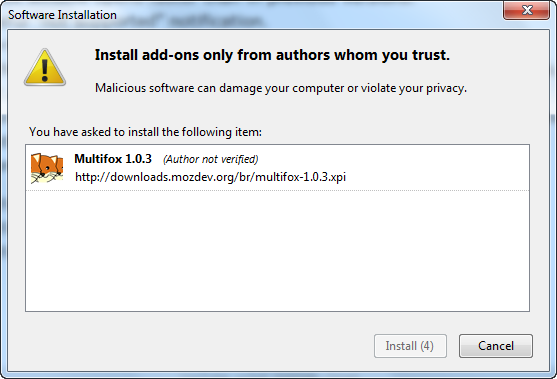
2.It may give you a pop up to allow it. Just click allow and you will see a install window like below. Click On Install.

https://blogger.googleusercontent.com/img/b/R29vZ2xl/AVvXsEiaeGKxag14Ali6m1dirdhu6rM-2f2A2TXD7Iu92YW2LH_mHjumPTExd4A-DPpJZM7O3Dp_GOd23pJcZJpd1dmTtpQdBLP6QW4kkaSZc-rD_jBD9MYrS7K61rTAoVImFRic7CXebzFie1jb/s1600/multifox-+2+account+in+same+browser-install.png

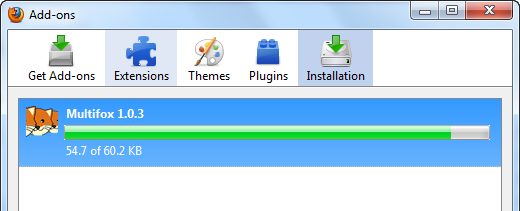
https://blogger.googleusercontent.com/img/b/R29vZ2xl/AVvXsEgsaeeqqbDzmVMxDb61RNmk22ydAIcmJbqKrQQinFeJ0ukeTD1mc3AJOy7cNKzFB_gk0VBQn1nSg8VL_HZOUEmVGycy-ckQ_A_JxyQLZqXCFm85JGdECPRzlCk0bMndEoF3_qymSyigAa2S/s1600/multifox-+2+account+in+same+browser-installing.png

3.After Installing you will be asked to Restart your Firefox. Just save your work and Restart.

4. After restarting your browser you can right click on Tab menu and then select Open in a new Identity profile

5. It will open a new Firefox Window where you can log in to your second account freely without Log out from 1st one. Hope this trick help you.

Check Username Availability at Multiple Social Networking Sites

Namechk can quickly let you know if a username is available across many of the social media sites.

Deciding on a business name but wanted to make sure the name is available across the major social media sites? Thinking off venturing into the social media websphere but don’t want to deal with multiple usernames? Well, Namecheck is a best solution for that :

Site : http://namechk.com/

'Adventure World' Coming Soon On Facebook

The newest Zynga game on Facebook will allow users to team up and play. This is the first of its kind game from Zynga with 20,000 different objects in Adventure World. The company expects this game to be a hit as it has invested a year in building the whole new game engine.

Adventure World is a game where Indiana Jones meets Super Mario Brothers with a tinge of FarmVille. The game will be live on Facebook in the coming weeks.

How to Upload Photos on Facebook

In an alternate universe, perhaps there's a version of Facebook without faces -- and that strange variant is probably the most boring Web site ever. The photos that let you share the faces of your friends and family are a key reason that Facebook is exceedingly popular. Now you just need to understand the best ways to share your photos.

As with all things on the Web, there are multiple ways to accomplish Facebook-related tasks. That includes the various methods you might employ in uploading and editing pictures destined for Facebook fame.

But before we get to the specifics, here are some critical reminders for anyone taking their first plunge into Facebook photo fun. For one, don't even think about uploading images that you wouldn't share with every one of your friends and family.

So keep those pictures of your naked, drunken self to … well, yourself. Because once that picture is online, you should always assume that it could appear anywhere else on the Web -- maybe even on your grandmother's computer screen. Don't assume that privacy controls of any kind will protect your pictures or your reputation.
With that caveat out of the way, it's simple to share pictures on Facebook. After you log in to your account, you'll see your "news feed," which is a chronological list of updates, photos and links that your Facebook friends have posted.

If you simply want to post a picture to your "wall" so that it appears in your friends' "news feed," click "photo," which is at the top of the page next to "share." You'll see three self-explanatory options: "upload a photo from your drive," "take a photo with a webcam" and "create an album with many photos."

With the first two options, you can immediately share a single image on your "wall." Using the third option, you can upload as many photos as you want, but this process takes a bit more time and you'll have different options for sharing these images.

How to speed up Internet Explorer 7

To increase the speed of Internet Explorer 7 by modifying the maximum number of connections per server. This should allocate the additional bandwidth and reasonably improve internet browsing performance. Using registry editor, you can implement this task in all windows versions with minimum effort. Make sure before modifying your system Registry about its backup because Registry contains all information how your system runs. This backup will help you to restore Registry in case any problem occurs after modifying.
Follow the given steps to increase the explorer speed:

To use this feature, you will need to be logged into your computer with administrative rights.
Click Start button and type regedit in Run option then press Enter for next.


Here locate the location to:


HKEY_LOCAL_MACHINE\SOFTWARE\Microsoft\Windows\CurrentVersion\InternetSettings.                      Here in right side panel, locate the values called "MaxConnectionsPerServer" and "MaxConnectionsPer1_0Server".


If these values are not present then in right side panel, right-click to create new DWORD value with the name "MaxConnectionsPerServer" and "MaxConnectionsPer1_0Server" then assign number 6 in value data for both keys.


Now close the registry editor and restart your computer after any changes to go into effect.

Speed up your internet by 20%

Microsoft reserves 20% of your available bandwidth for their own purposes like Windows Updates and interrogating your PC etc

You can get it back:

Click Start then Run and type "gpedit.msc" without quotes. This opens the group policy editor.

Then go to:
--> Local Computer Policy
--> Computer Configuration
--> Administrative Templates
--> Network
--> QOS Packet Scheduler
--> Limit Reservable Bandwidth.
 
Double click on Limit Reservable bandwidth.
 It will say it is not configured, but the truth is under the 'Explain' tab i.e." By default, the Packet Scheduler limits the system to 20 percent of the bandwidth of a connection, but you can use this setting to override the default."
So the trick is to ENABLE reservable bandwidth, then set it to ZERO. This will allow the system to reserve nothing, rather than the default 20%.

Download Brand New Google+ Windows 7 Theme

Google Plus Wallpaper 04 VikiTech Download Brand New Google+ Windows 7 Theme

Google Plus the new social network by Google. Google Plus is pretty good and loads fast.Google Plus looks solid and is quite awesome to use. icon wink Download Brand New Google+ Windows 7 Theme Google Plus got attention of many internet users and it started growing rapidly. It has also fired the imagination of artists and has generated a number of artworks based on the Google Plus theme and presentation. Here is cool brand new Google+ theme for windows user icon smile Download Brand New Google+ Windows 7 Theme

Get Access into Registration-Required Sites without Need to Register


Are you annoying of having to register on a free Web site just to read some news or view some information? Rather than registering on such Web sites (and risking your email of annoying spam).
I have a simple method to get access to protected content without need to endure the annoyance of signing up for an account. Every time relatives and friends send me links to registration-required Web sites, I’ll visit BugMeNot to bypass most of these annoyance.

BugMeNot is a free Web site that stored registered user account logins and passwords so you don’t have to provide your personal info.

Once you at BugMeNot front page, just type in the URL of the website that you’d like access. BugMeNot then will return a list of user names and passwords along with their accuracy percentage.

For Firefox users, BugMeNot provide the extension that automates these process. Once you’ve installed the extension, you can easily access the website you like by right click on the username or email address text box.

Create friends group on Google SMS channel and Send SMS to your friends for free

Recently Google India team launched an interesting service called “Google SMS channel“. Using Google SMS channel you can send SMS text messages to your friends for free. Even you can get SMS alerts on your mobile for news, cricket scores, Jokes, Job alerts and lot more, all for no cost! (Image credit: katielips)

How it works? Create a group on Google SMS channel. Invite your friends to join this group by providing their mobile numbers. That’s it. You all can send SMS text messages to this group, which will reach to all registered phone numbers in your group. Isn’t it that simple?

Another interesting use of this service is to get daily jokes on your mobile. Just search all the existing public Google SMS channels for your favorite subject and subscribe to that channel or group. For example if you want to get latest cricket updates or score, just search the group names like “cricket updates” and subscribe to appropriate group. You will get all cricket score updates for free on your mobile through SMS text alerts. If you subscribe to any jokes channel and if you don’t want spammed by messages during busy hours then you can set the SMS message frequency per day like only 4 text messages per day between 6 pm to 10 pm. You can unsubscribe from any channel at any time.

Publishers can use this service like RSS feed subscription. Publishers can send blog updates to their readers via SMS.
This SMS service is currently available for Indian phone numbers only. Soon may be available for other countries. Other than English some local Indian languages like Hindi, Tamil etc. are also supported to compose the SMS test messages.
How to start?
Head to Google SMS channel, register your phone number with Google and get your favorite channel content on your mobile all for free.